5/10/17

National Scrapbook Day: Pick-a-Sketch

I love a good sketch challenge, so I made it a priority to do the Pick-a-Sketch challenge at Scrapbook.com. This one was unusual in that we got to pick the sketch ourselves instead of everyone using the same one. Freedom is great, but it was so hard to narrow down the choices!

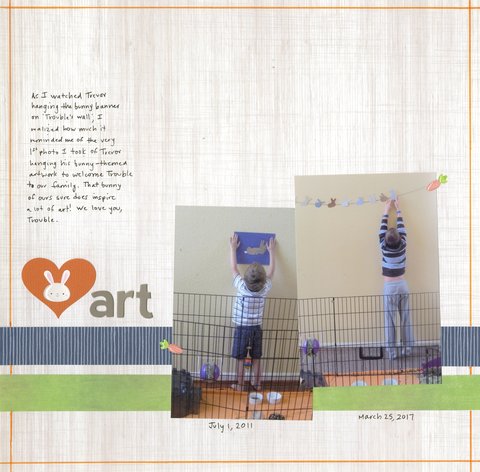
Here is what I made, followed by the sketch that inspired it:


As you can see, I followed the sketch very closely. Other than flipping it horizontally and adding the punched heart to my title, I left everything else the same. I even used the little carrot stickers as photo turns. It was the perfect sketch to document Trevor hanging bunny art on Trouble's wall at age 5 and again at 10. 

5/9/17

National Scrapbook Day: NSD Challenge

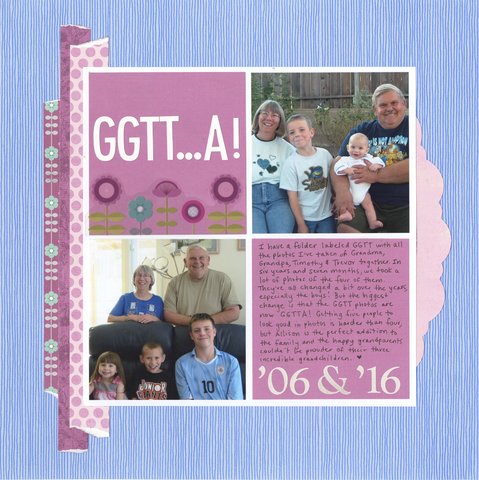
Here's project #2 from National Scrapbook Day. I made this page for the NSD challenge. It was a four hour challenge in which we had to make a layout incorporating items starting with N, S, and D. 

GGTT...A (affiliate link)

N = numbers (or niece and nephew!)
S = stripes, squares
D = dots, die-cut

The arrangement with four squares came together really quickly, but I struggled with what papers to use. I tried a bunch of different combinations before this one. Finally, I realized that the pinks and purples over the blue base made sense symbolically. The journaling says that I took so many photos of Grandma, Grandpa, Timothy and Trevor over the years that I had a folder labeled GGTT. When Allison was born, I changed it to GGTTA. Allison has certainly added a lot of pink and purple to our lives over the last four years!

There are a lot of things I like about this layout, but my favorite is that Grandma, Grandpa, Timothy and Trevor have the exact same smiles and head tilts in the two photos, which were taken ten years apart. Look at Timothy in particular. Same smile, same lean, same shoulder forward. Trevor has teeth now, but the smile is the same. Love it. 

5/8/17

National Scrapbook Day: Selfie Challenge

Wow! National Scrapbook Day was awesome. I scrapped for 15 hours straight and completed 14 layouts with three more almost done. What an amazing day!

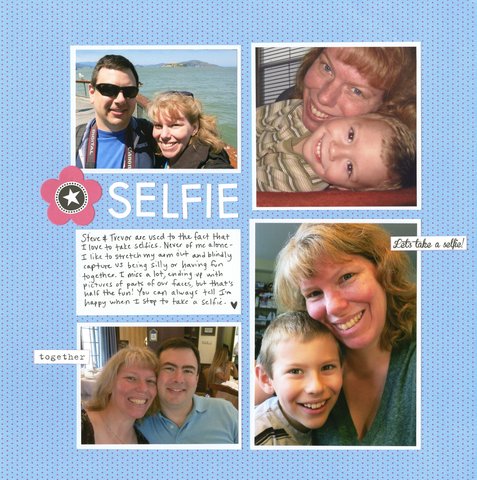
If there's a downside to National Scrapbook Day, it's that you can't be everywhere. I try to participate in as many online events as I can, but even with hopping around from site to site, I had to pick and choose among a bunch of great events. I spent most of my day working on challenges at Scrapbook.com, Scrapbook and Cards Today, Gossamer Blue and the Scrap Gals. I'll be sharing what I made over the next few weeks, starting a selfie challenge.

The selfie challenge was timed, with a relatively luxurious 3 hours to complete a page using a selfie. That would have been no problem if I had a photo printer or printed selfies ready to go, but I didn't. At least, I didn't think I did. I went through my box of extra photos and found four selfies from way back and put them all together on a page. 


I'm experimenting with embedding my layout from Scrapbook.com instead of uploading it directly. That means that if you click the link, it will take you to my gallery where you will find the products I used. Those are affiliate links, meaning I will get a commission for anything you buy at Scrapbook.com after following my link. It won't cost you anything extra.

I'm really happy with how my first layout turned out. It's clean, it's simple, the focus is on the photos, and I've told the story in my own handwriting. And bonus points for scrapping photos from the box of extras!

5/6/17

Happy National Scrapbook Day!

Happy National Scrapbook Day!

My plan for today is to complete as many challenges as I can. I have a clean craft room, printed photos, a ridiculous stash of supplies, and plenty of adhesive. It's 4 am and I'm rarin' to go. Let the scrapping begin!

5/5/17

Testing the IDO3D Pro Pen

One of the highlights of Snap Conference was getting the opportunity to speak with representatives of all the sponsoring brands and try out their latest products. I especially enjoyed the chance to learn about things I'd never heard of, including the IDO3D Pro


We already own a 3-D pen (which I reviewed here), but the IDO3D is completely different. Instead of using heat to melt solid rods of colored plastic like the 3Doodler does, the IDO3D uses UV light to cure liquid plastic to make it solid. The folks at Redwood Ventures, who make the IDO3D, were kind enough to send me home with a sample to see how it compares.

Trevor (age 10) was thrilled. He had the pen out and assembled pretty much the minute it came out of my suitcase. Within another few minutes, he had made his initials. 


He changed colors and kept creating. He wasn't making masterpieces with his first attempts, but he was very happy just playing and making shapes. 


Eventually, Trevor did let me have a turn. My impressions? I like it. The IDO3D has some major advantages over the 3Doodler. Granted, we have an early version of the 3Doodler and I've heard that later models address some of my complaints, but just putting the two side-by-side, there is no comparison in my mind. The IDO3D is easier to use, does not hurt my hand, is silent, smells better (there's a plastic smell, but it's not horrible), and with no hot tip, is much safer. It is cordless, weighs less, and, as it turns out, is cheaper. 

Steve took a turn. He gave the IDO3D pen a smily face.


Trevor loves the IDO3D pen. Need further proof? I found him early the next morning, still in his pajamas, creating more shapes. 


A quick search on Amazon reveals that there are many different versions of the IDO3D (affiliate link) at a variety of price points. I can only vouch for the IDO3D Pro and would recommend it without hesitation. If any of you have tried other IDO3D products, I'd be very interested in hearing what you think of them.